Community
Free
For learning, teaching, academic research and non-profits.
- Every simulation feature
- Reports marked “Non-commercial use”
- Free sign-in by e-mail, no card
Nothing to install · free 30-day trial for work
Your Excel model gives one answer. Decide with the odds: the chance of hitting your budget, date or target, what drives it, and which decision works best.
Runs in your browser on Windows, macOS and Linux; Chrome and Edge recommended. Nothing to install, no admin rights needed.
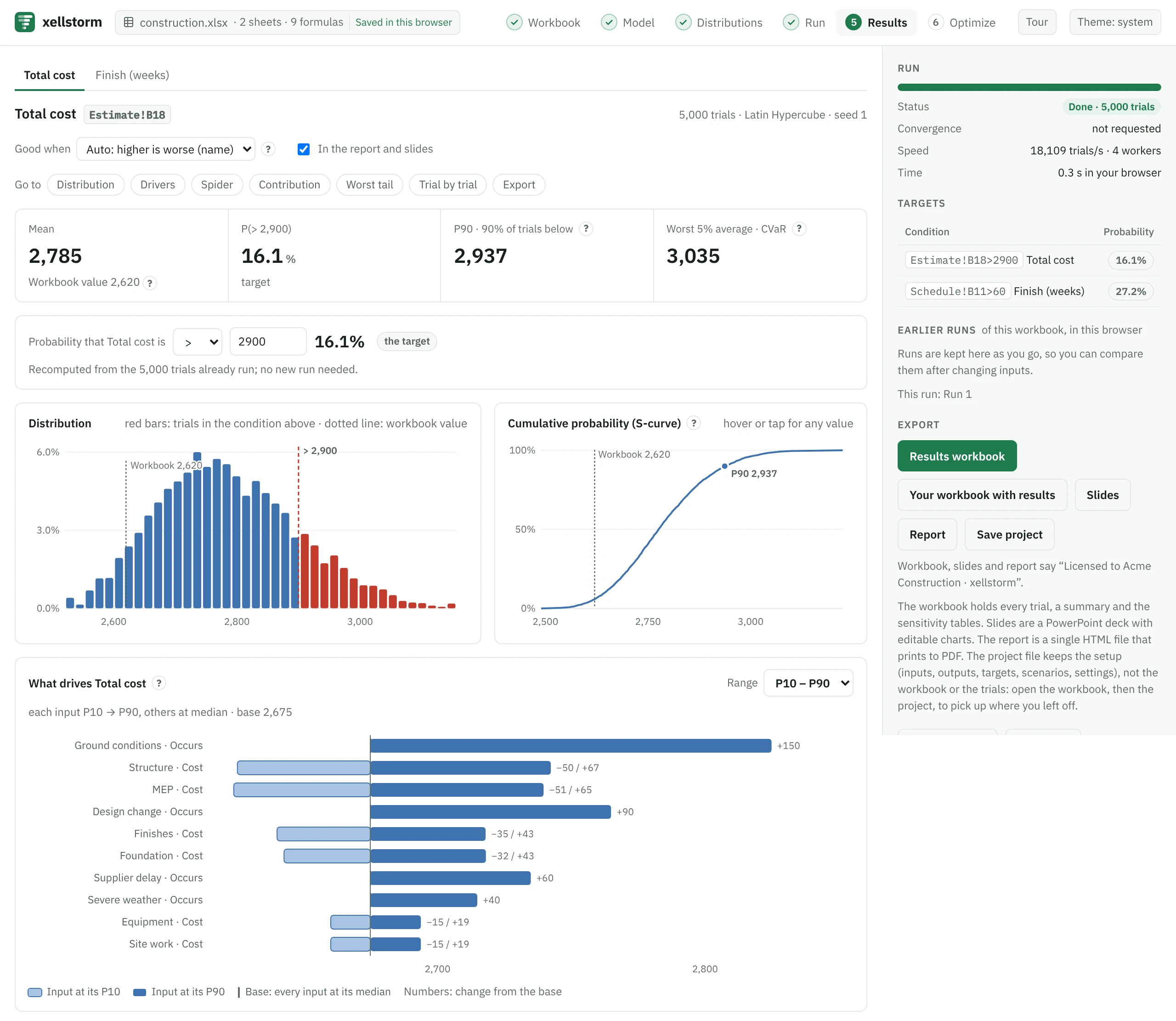
Your model is calculated inside your browser tab. Your workbooks, inputs and results never reach our server, unless you connect an AI assistant to the app.
Trials run in parallel on your CPU cores, most workbooks recalculate only the cells each trial changes, and a run can stop as soon as the results are stable.
When you open a workbook, its formulas are recalculated and compared with the values Excel saved in it. You see how many match, and any cell xellstorm cannot calculate is flagged, never guessed.
Drop an .xlsx, .xlsm or .xls file. It is read and checked in your browser; formulas stay as you wrote them.
Your sheet opens as Excel shows it, with likely assumptions and results outlined. Pick an assumption to make it a range: it starts at 90% to 110% of your number, and can be linked to the Min / Likely / Max next to it. Pick a result to track it.
See the odds of hitting your targets and what drives them. Export a results workbook, an HTML report or PowerPoint slides.
Connect Claude, or another assistant that supports MCP connectors, to the app. Ask in plain words next to your workbook: it marks the uncertain cells, sets their ranges, runs the simulation in your xellstorm tab and explains the odds.
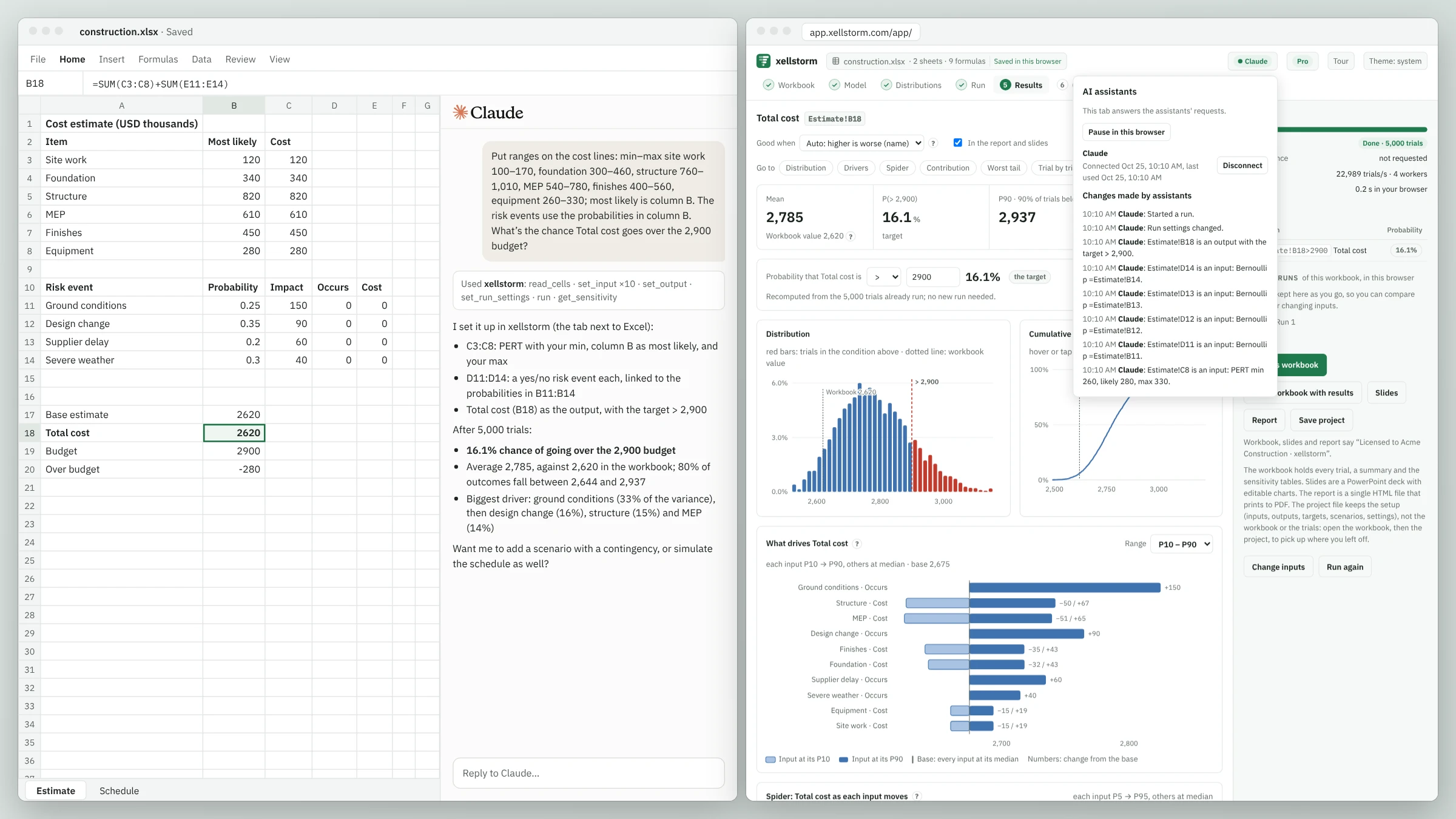
The app asks you before an assistant can connect. Pause or end the connection at any time from the app’s header.
Each change shows in the app as it happens, with a log of what the assistant did. Changes to inputs and outputs can be undone.
The assistant asks for cell addresses, values and result summaries; they pass through our server without being stored. The workbook file itself is never uploaded.
In Claude, find xellstorm under Customize > Connectors. In another assistant, add https://app.xellstorm.com/mcp as a connector.
Your assistant opens xellstorm in your browser. Sign in and choose Allow.
Open your workbook in the app, keep the tab open and ask in plain words.
How to connect an AI assistant, step by step · What passes through our server while it is connected is described in our Privacy Policy.
Nine example models open in the app with their inputs, outputs and targets already set, ready to run: no file of your own needed, no sign-up. Or start from a workbook built for an Excel add-in, or from your own.
Each example is worked through step by step in the learning center: NPV and IRR, project contingency, risk register, reorder point, tolerance stack-up, reliability, order quantity, cash-flow runway and delivery lead times.
Where an exact answer exists, every update of xellstorm is checked against it.

xellstorm reads the formulas and draws the workbook as blocks of assumptions, calculations and results, named after the labels next to them. Pick inputs and outputs on the map or on the sheet as Excel shows it; likely ones are outlined for you. Select a formula to see the cells it reads outlined, as in Excel; inputs that no output uses are flagged before you run.

Find the order quantity, price or budget that maximizes the mean, a percentile or the chance of success, under risk limits such as “chance of a stockout at most 50%”. Goal seek and one- or two-way sweeps are there too.
Every candidate runs on the same random numbers, and the best ones are re-run with more trials, so you know whether the winner is really better or just lucky.

Summary numbers hide thresholds and sudden changes. Plot any input or output against another, one dot per trial, with the trials in your target condition, such as cost over budget, in red. Spider charts show how each input moves the result, and worst-tail drivers show what pushes it into the bad tail. When a trial gives an error instead of a number, xellstorm evaluates it again and shows the cell where the error starts; reports name it too.
PERT, triangular, lognormal, Weibull, discrete risk events and more, plus the further families add-in models use; discrete, cumulative, general and Metalog tables and triangulars set by percentiles, any of them truncated or shifted.
Compound distributions add up the sizes of a random number of events, with an optional deductible and limit per event. Splice a body to a heavy tail, describe yearly peaks with a GEV, and split a total into shares that always add up (Dirichlet).
Min / Likely / Max or Low / Base / High columns link to a PERT, so edits in Excel carry over. Fit to historical data by maximum likelihood, or to P10, P50 and P90 estimates.
Edit or paste a matrix, or estimate it from historical data. A matrix that is not consistent is corrected to the nearest valid one, and a scatter plot shows the correlation you got. A Student’s t copula makes extremes come together more often at the same rank correlations, and reports give each pair’s tail dependence.
Random walk, AR(1), geometric Brownian motion, mean reversion and jump diffusion paths for prices, demand and rates; a row of yearly results reads as a fan chart.
Tornado, spider and worst-tail drivers, rank correlation, contribution to variance, and a first-order (Sobol) index that also catches effects that rise and fall.
The average of the worst 5% (CVaR), percentiles, and how often two targets are missed together.
Scenarios run on the same random numbers, so the difference you see comes from the decision, not from different random draws.
Latin Hypercube sampling, and an optional stopping rule that runs until means and percentiles settle within your tolerance, instead of a guessed number of trials.
A parameter you know only roughly, such as a mean demand or a failure rate from a few cases, can be drawn once per outer iteration while everything else varies trial by trial. This two-dimensional simulation shows how far a P90 or the chance of a loss could move because of what you do not know.
When your scenarios are options to choose between, see what a study, test or forecast could be worth before you choose: the expected value of perfect information (EVPI), and of knowing each input alone (EVPPI).
A results workbook with every trial, a single-file HTML report that prints to PDF, and PowerPoint slides with editable charts, including the plots you pick. Colleagues and clients read them in Excel, PowerPoint or a browser: no license, no viewer. Or get your own workbook back with the results added as cell notes and a summary sheet.
Your workbook stays a plain Excel file: xellstorm adds no functions to it, so there is nothing to strip out if you stop. Your setup is kept in your browser, and you can save it as a small project file next to the workbook.
Each report records the engine version, trials, seed and sampling method; the results workbook and HTML report also record the workbook’s SHA-256 fingerprint.
The same model and seed give the same numbers, whatever the number of CPU cores. Save a project and rerun it later.
Open the workbook you already have. xellstorm reads the add-in’s functions and sets up the simulation from them:
Try it on your existing workbook See every supported function
Moving from @RISK, ModelRisk or Analytic Solver: what converts, and how each compares.
| Excel add-in | xellstorm | |
|---|---|---|
| Excel | Needed on every computer that runs the model | Not needed: runs in your browser on Windows, macOS and Linux |
| Installation | An add-in to install in Excel and keep up to date | None, and no admin rights |
| Your workbook | Add-in functions in the cells; without the add-in they cannot calculate | Plain Excel: nothing written into it, nothing to remove later |
| Colleagues | Need the add-in to rerun the model | Open it in the browser; report readers need no license |
Every feature, optimization included: $588 per user per year, or $59 month to month. 30-day free trial, no card needed.
Your model is calculated inside your browser tab, so workbooks, inputs and results never reach our server, unless you connect an AI assistant to the app.
Recent workbooks, settings and run history are kept in your browser’s own storage, on your computer.
Results workbooks, HTML reports and slides are built in the tab and saved as files on your computer.
The app loads nothing from other servers, and its Content Security Policy lets it connect only to its own address.
Check it yourself: open your browser’s developer tools, run a model and watch the Network tab. No request carries your workbook. IT teams can read the app’s Content Security Policy in its response headers.
Free for non-commercial use. For work, try every feature free for 30 days, no card needed.
Free
For learning, teaching, academic research and non-profits.
$49 / month
billed annually ($588), or $59 month to month
For one professional, at work.
from $44 / user / month
billed annually: $49 for 2 to 9 users, $44 from 10; or $59 month to month
For teams of 2 to 25 users, on one subscription.
From $10,000
per year, billed annually
For large organizations.
Seats are only for the people who build and run models. Everyone else reads the reports in Excel, PowerPoint or a browser, with no license.
Prices in USD, or the same amounts in EUR, excluding VAT and sales tax. Orders are processed by Freemius, our reseller and merchant of record, who issues invoices and handles taxes. Card or PayPal; 30-day money-back guarantee. Can only pay against a purchase order? We invoice annual prepayments from $3,000.
Open an example model, or your own workbook. Pick the assumptions you are unsure of: each starts as a range from 90% to 110% of your number, which you can widen or link to the Min / Likely / Max columns next to it. Pick the results you care about, set a target such as “total cost above 2,900”, and run. You get the chance of hitting it and the assumptions that matter most.
Or read Monte Carlo simulation in Excel for the method, with formulas you can try in Excel itself.
Start with the default of 5,000, or let xellstorm decide: it can keep running until the mean and percentiles settle within your tolerance. Latin Hypercube sampling, the default, usually needs fewer trials than plain random sampling.
No. The workbook is read and calculated inside your browser tab and stored only in your browser. Workbooks, inputs and results never reach our server, unless you connect an AI assistant to the app: then what the assistant asks for passes through our server on its way, without being stored.
Yes. Connect xellstorm from Claude’s connectors directory, or add https://app.xellstorm.com/mcp as a connector in another assistant that supports MCP connectors with sign-in. Once you allow it in the app, ask in plain words: the assistant marks the uncertain cells, sets their ranges, runs the simulation in your xellstorm tab and explains the results. The connector comes with every plan. How to connect an AI assistant.
The formulas common in financial, engineering and project models, including NPV, XNPV, IRR, XIRR, PMT, EDATE, EOMONTH, WORKDAY, NETWORKDAYS, SUMIFS, INDEX, MATCH, XLOOKUP and OFFSET. Every workbook gets a compatibility check before you run it, counting any cell xellstorm cannot calculate.
Not supported: links to other workbooks, VBA macros and user-defined functions, and a few newer functions such as FORECAST.ETS; cells that depend on them are flagged, never guessed. Data tables keep their saved values during a run.
.xlsx and .xlsm workbooks, and .xls workbooks from Excel 97 to 2003. Save .xlsb files as .xlsx first, and remove the password from workbooks that need one to open.
xellstorm offers 52 distributions. PERT, triangular, uniform, normal, lognormal, gamma, beta, Weibull, Poisson, binomial and Bernoulli cover most models; Student’s t, Gumbel, GEV, Pareto and others describe heavy tails and extremes; discrete, cumulative, general, histogram and Metalog tables take your own values. Compound distributions add up the sizes of a random number of events, splices join a body to a tail, and Dirichlet shares add up to a total. Which distribution to use.
The same model, not the same random numbers. Converted distributions keep their parameters, correlations keep their rank correlations, and anything that is not converted is listed with the reason. Once everything converts and the compatibility check is clean, means and percentiles differ from your add-in’s by sampling noise, which shrinks as you run more trials; with correlated inputs, each tool pairs the draws its own way, so the tails can differ a little more. What converts, function by function.
There is nothing to install and no admin rights are needed, but your IT team may still want to check. The app loads nothing from other servers, its Content Security Policy lets it connect only to its own address, and the browser’s Network tab shows that no request carries a workbook. For use inside your own network, Enterprise offers on-premises deployment on request.
Not yet: keep a connection while you use the app. It only loads the app’s own files; your workbook is still calculated on your computer and never uploaded.
Personal learning, hobby projects and coursework; teaching and coursework at accredited schools and universities; academic research intended for publication; and the own operations of registered charities and non-profits.
Work for a business, a government body or a client is commercial use, including freelance and consulting work, research funded by or done for a company, and evaluation beyond the trial period.
When you sign in to open your own workbook, you tell us which applies, and we keep your answer. The example models open without signing in.
Nothing is charged: the trial needs no card, and your workbooks, setups and runs stay in your browser. To keep using xellstorm for work, choose Pro or Team. If you use it only for learning, teaching, research or a non-profit, switch to Community: free, with reports marked “Non-commercial use”. The trial is once per person.
A seat is one named user who builds and runs models; people who only read the reports need none. Team comes in packs of 2, 3, 5, 10, 15, 20 or 25 seats, at $44 per seat per month from 10 seats, billed annually.
Pro and Team are paid by card or PayPal, and every order comes with an invoice that carries your VAT number. If your organization can only pay against a purchase order, contact us: we accept annual prepayment from $3,000, and Enterprise is always invoiced.
Government bodies use the commercial plans and can pay with a purchase card. If yours needs an invoice or purchase order, contact us: as for companies, we invoice annual prepayments from $3,000. Teaching and published academic research are free on Community; university administration uses the commercial plans.
Any time. Your plan runs until the end of the period you paid for, and every first payment has a 30-day money-back guarantee.
No: it runs in the browser, so there is nothing to install.
Free for non-commercial use, and free for 30 days at work. Start with an example, or open your own workbook: it is calculated in your browser and never uploaded.